




Add simple interactions to the otherwise static django admin.
PyPI • GitHub • Full documentation
Creator & Maintainer: Ambient Digital
django-dynamic-admin-forms
Add simple interactions to the otherwise static django admin.
Installation
Install the package via pip:
pip install django-dynamic-admin-formsor via pipenv:
pipenv install django-dynamic-admin-formsAdd the module to
INSTALLED_APPS: .. code-block:: python- INSTALLED_APPS = (
“django_dynamic_admin_forms”, “django.contrib.admin”,
)
Ensure that the
dynamic_admin_formscomes before the defaultdjango.contrib.adminin the list of installed apps, because otherwise the templates, which are overwritten bydynamic_admin_formswon’t be found.Ensure that the
dynamic_admin_formstemplates are found via usingAPP_DIRSsetting: .. code-block:: python- TEMPLATES = [
- {
“BACKEND”: “django.template.backends.django.DjangoTemplates”, “APP_DIRS”: True,
},
]
Run
python manage.py collectstaticto include this apps Javascript code in yoursettings.STATIC_ROOTdirectory
Usage
Add the
django_dynamic_admin_forms.DynamicModelAdminMixinto your admin classesAdd the
django_dynamic_admin_forms.urlsto your urlsfrom django.contrib import admin from django.urls import path, include urlpatterns = [ path("admin/", admin.site.urls), path("dynamic-admin-form/", include("django_dynamic_admin_forms.urls")), ]
In addition to the standard
fieldsdeclaration, specify a list ofdynamic_fieldsFor each dynamic field, add a method
get_dynamic_{field_name}_fieldto the adminInput:
data: Dict[str, Any]- the cleaned form dataOutput:
queryset: Optional[Queryset]- The values to select fromvalue: Any- The value, the field should have (must be compatible to the field type)hidden: Bool- True, if field should be hidden
A rather non-sensical example: ```python from django.contrib import admin
from .models import MyModel from django_dynamic_admin_forms.admin import DynamicModelAdminMixin
@admin.register(MyModel) class MyModelAdmin(DynamicModelAdminMixin, admin.ModelAdmin):
fields = (“name”, “city”) dynamic_fields = (“city”,)
def get_dynamic_city_field(self, data):
    # automatically choose first city that matches first letter of name
    name = data.get("name")
    if not name:
        queryset = City.objects.all()
        value = data.get("city")
    else:
        queryset = City.objects.filter(name__startswith=name[0])
        value = queryset.first()
    hidden = not queryset.exists()
    return queryset, value, hidden
## How it works
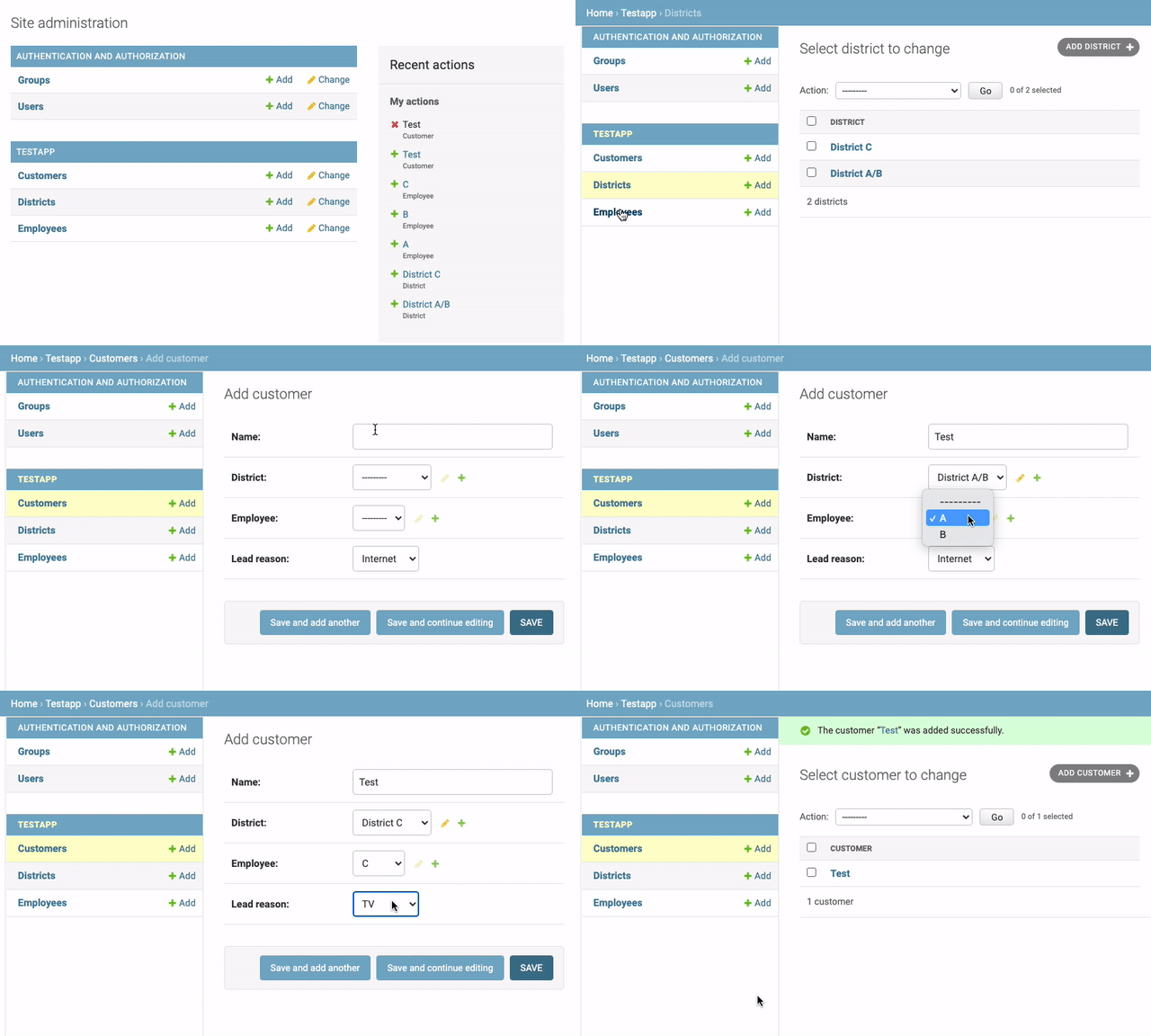
Whenever a dynamic form changes, an event handler makes a request to a special endpoint, which returns new HTML to swap
into  the existing form. This new HTML is directly generated by `django.contrib.admin`, so we only have to set the
outerHTML of the correct HTML elements to update the form.

## Limitations
- does not work in conjunction with inlines
- does not validate that the selected value is really part of the original queryset
  - if anybody can modify your DOM, they could potentially inject invalid values
  - you have to write `Model.clean()` methods to guard against that
- only tested with Django 3.2

## Development

For local development, create a virtual environment
in the `testproj` folder:
```shell
$ cd testproj
$ python3 -m venv .venv
$ source .venv/bin/activate
$ cd ..
$ flit install --symlink
Now the package should be available in your virtual environment and any changes should be directly visible.
Alternatively, copy the directory dynamic_admin_forms
into any normal django project, so that the python interpreter
finds the local version instead of the installed (old) version.
Running E2E tests
To run end-to-end tests locally:
$ cd testproj
$ python manage.py runserver 0.0.0.0:8000 &  # start server
$ python manage.py loaddata fixtures/fixtures-dev.json
$ cd ../e2e
$ yarn install  # or npm install (only needed first time)
$ yarn cypress  # or npm run cypress
Installation
Install the package via pip:
pip install django-dynamic-admin-formsor via pipenv:
pipenv install django-dynamic-admin-formsAdd the module to
INSTALLED_APPS:INSTALLED_APPS = ( "django_dynamic_admin_forms", "django.contrib.admin", ) Ensure that the ``dynamic_admin_forms`` comes before the default ``django.contrib.admin`` in the list of installed apps, because otherwise the templates, which are overwritten by ``dynamic_admin_forms`` won't be found.
Ensure that the
dynamic_admin_formstemplates are found via usingAPP_DIRSsetting:TEMPLATES = [ { "BACKEND": "django.template.backends.django.DjangoTemplates", "APP_DIRS": True, }, ]
Run
python manage.py collectstaticto include this apps Javascript code in yoursettings.STATIC_ROOTdirectory
Releasing a new version
Releases are fully automated. Push a version tag and the pipeline will build, sign with Sigstore, publish to PyPI via Trusted Publishing, and create a GitHub Release — no API tokens needed.
git tag v<version>          # e.g. git tag v1.2.3
git push origin v<version>
Tags must start with v. Tags without the prefix won’t trigger the pipeline.
First-time setup
Before the pipeline can run for the first time, an admin must:
**Create GitHub Environment
pypi**Go to Settings → Environments → New environment, name it exactly
pypiUnder Deployment branches and tags, add a tag rule with pattern
v*Optionally add required reviewers for a manual approval gate
Configure PyPI Trusted Publisher
Go to PyPI → Project settings → Publishing → Add a new publisher
Fill in: Owner
ambient-innovation, Repositorydjango_dynamic_admin, Workflowrelease.yml, Environmentpypi
Publish to ReadTheDocs.io
Fetch the latest changes in GitHub mirror and push them
Trigger new build at ReadTheDocs.io (follow instructions in admin panel at RTD) if the GitHub webhook is not yet set up.
Maintenance
Please note that this package supports the ambient-package-update.
So you don’t have to worry about the maintenance of this package. This updater is rendering all important
configuration and setup files. It works similar to well-known updaters like pyupgrade or django-upgrade.
To run an update, refer to the documentation page of the “ambient-package-update”.
Contents: